

Management
Guide: Sending Bulk Messages on Business WhatsApp
Everything your company needs to know to send bulk messages on WhatsApp safely and within Meta's rules.
Zapper Team
·
·
17 min of reading

Sending messages at scale through WhatsApp is a real need for most companies. But the line between efficient communication and spam is thinner than it seems, and the consequences of crossing it are serious: a blocked number, a damaged reputation and broken relationships with customers.
This guide covers the subject end to end, from the definition of bulk sending to Meta's updated rules, including the most common mistakes and the best practices for scaling campaigns without compromising the user experience.
What is a bulk send on WhatsApp?
A bulk send, or batch broadcast, is the automated sending of messages to multiple recipients simultaneously or on a schedule. In the corporate context, this includes marketing campaigns, transactional notifications, operational alerts and relationship communications.
What sets a professional bulk send apart from personal WhatsApp use isn't just volume. It's the infrastructure behind it, the segmentation of the base, the content of the messages and, above all, the recipients' consent.
Companies that do this correctly use the WhatsApp Business Platform (API), the official infrastructure Meta provides for communications at scale. Anyone who tries to replicate the same result with the regular app or unofficial tools is operating outside the terms of service, at risk of a permanent ban on the number.
Find out more in this article: Is your company taking full advantage of WhatsApp Business?
Spam versus business communication: what's the real difference?
The confusion between spam and legitimate business communication is responsible for a good share of the blocks companies suffer. But the distinction is objective.
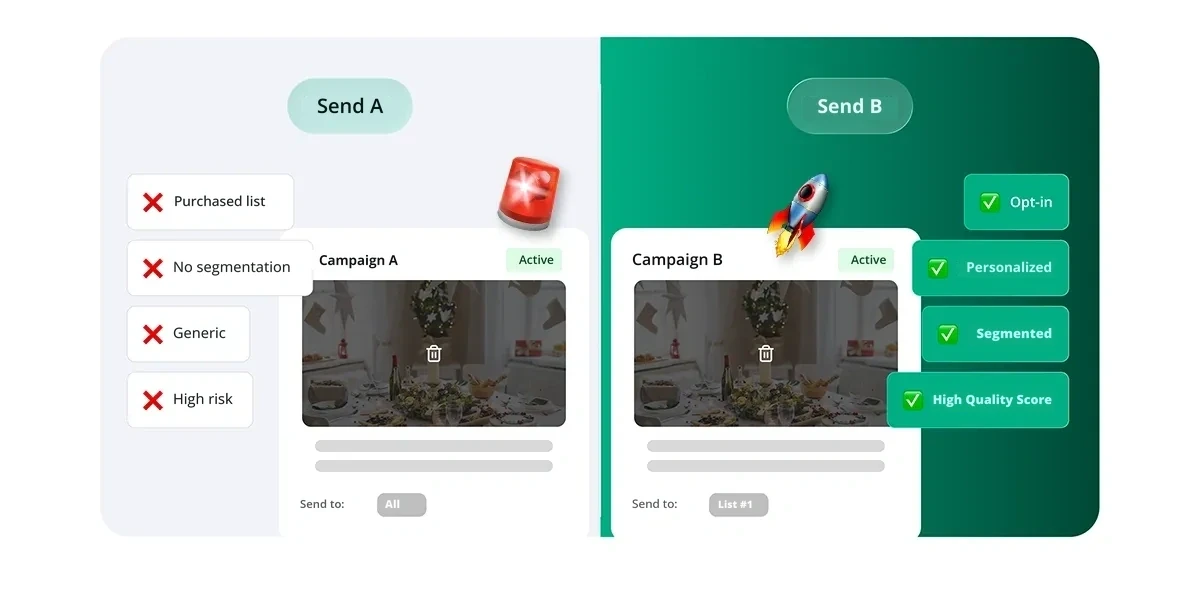
Spam is any message sent without prior consent, with content irrelevant to the recipient, at excessive frequency or with the intent to deceive. On WhatsApp, spam is usually identified by the users themselves, who block the number or report it to the platform.
Legitimate business communication is one in which:
The recipient opted in to receive messages on that channel (documentable opt-in);
The content is relevant to that contact's moment and context;
The frequency is reasonable and not intrusive;
There is a clear way to unsubscribe (opt-out);
The sends respect the policies of the platform used.
Meta doesn't prohibit bulk sending. It regulates how that sending happens. Companies that follow the rules can scale communication safely. Those that ignore the rules are penalized progressively: first the number's reputation degrades, then it is restricted, and in serious cases, permanently banned.
How does the WhatsApp Business Platform (API) work?
The WhatsApp Business Platform (formerly called the WhatsApp Business API) is the infrastructure layer that lets companies send messages at scale, programmatically and integrated with other systems.
To access it, companies need a verified account in Meta Business Manager and the intermediation of an official partner (Business Solution Provider, or BSP). Direct access to the Cloud API is also possible for companies with a technical team.
What the API allows
Sending template messages to contacts who opted in
Integration with CRMs, customer service platforms and automation systems
Service by multiple agents on the same number
Webhooks to receive real-time notifications
Support for text, images, documents, videos and interactive buttons
What the API doesn't cover
Use of groups and communities
Free-form messages outside the 24-hour window without an approved template
Broadcasts to contacts with no recorded opt-in
Find out more in this article: Professional WhatsApp without the API's restrictions
It's worth clarifying: the API isn't the only solution for business communication on WhatsApp. Platforms like Zapper operate independently of the API, connecting directly to the company employees' WhatsApp Business accounts and offering broadcast, monitoring and intelligence capabilities without the restrictions and variable costs of Meta's infrastructure.
Find out more in this article: WhatsApp API: is it for my company or do I need another solution?
Meta's rules: what the official documentation says
Meta's policy for commercial use of WhatsApp is documented in the WhatsApp Business Messaging Policy and in the platform's developer guidelines. The central points:
Mandatory opt-in
Before starting any proactive conversation, the company needs the contact's documented consent. This opt-in can be collected through website forms, on WhatsApp itself, on landing pages or on other channels. What isn't accepted is presuming consent because the number appears on a purchased list or in old records.
Message templates and categories
Messages sent outside the active service window (the 24 hours after the customer's last message) must use a template approved by Meta.
Meta divides templates into three categories:
Marketing: promotional campaigns, launches, newsletters, re-engagement. These go through the most scrutiny in the approval process and have a higher cost per message.
Utility: transactional messages tied to a user action, such as order confirmations, appointment reminders, tracking updates and payment alerts.
Authentication: sending verification codes (OTPs). Fixed format, with no room for marketing content.
Since April 2025, Meta has tightened the automatic classification of templates. Templates submitted as "utility" that contain promotional language are automatically moved to the marketing category, with a direct impact on cost and sending conditions. Companies that abuse classification to pay less receive progressive restrictions.
Prohibited content
Meta's policy prohibits sends related to illegal products, unauthorized adult content, get-rich-quick schemes, among others. Regulated sectors (such as gambling and certain financial services) have additional restrictions and need prior authorization.
Tier system and sending limits
Meta controls companies' sending capacity through a system of progressive tiers. New verified numbers start with a limit of 250 unique conversations per day (outside the service window). As the company demonstrates quality in its sends, the limits rise automatically.
The available tiers are:
Tier | Daily limit of unique conversations started by the company |
|---|---|
Initial (unverified) | 250 |
Tier 1 (verified) | 1,000 |
Tier 2 | 10,000 |
Tier 3 | 100,000 |
Tier 4 | No defined limit |
To move from one tier to the next, the company must maintain a high quality rating (green) and demonstrate a consistent volume of sends. Meta automatically evaluates accounts in 6-hour cycles to decide on upgrades.
Since October 2025, limits are calculated at the portfolio level, not per individual number. This means all WhatsApp numbers linked to the same Business Portfolio share the same daily limit.
What counts toward the limit
Only messages initiated by the company outside the 24-hour window. Replies to customers who have already opened a conversation don't consume the quota.
Number reputation: how it works and why it matters
The number's reputation, which Meta calls the Quality Rating, is the main thermometer of the health of a WhatsApp Business account. It is calculated based on recipients' feedback signals over the last 24 to 48 hours, weighted by recency.
The three possible states are:
🟢Green (High Quality): well-received messages, with few blocks or reports. The number is eligible for tier upgrades.
🟡Yellow (Medium Quality): volume of reports above normal. The number can keep operating, but doesn't advance in tier and is under observation.
🔴Red (Low Quality): critical level of reports. The number faces sending restrictions.
When quality drops to red, the number may be temporarily flagged, which prevents the sending of new company-initiated messages. If quality doesn't recover, the tier limit is reduced to the level immediately below.
What destroys reputation
Sending messages without real opt-in
High frequency of sends with no perceived value
Generic content with no personalization
Contacts who block the number after receiving the message
Templates with aggressive or misleading language
What sustains reputation
Documented, recent opt-in
Personalized templates that are relevant to the recipient
Controlled frequency
A clear and working opt-out channel
Active monitoring of quality indicators
Learn how to use our solutions to optimize your results: Zapper Monitoring
How to structure campaigns without causing blocks
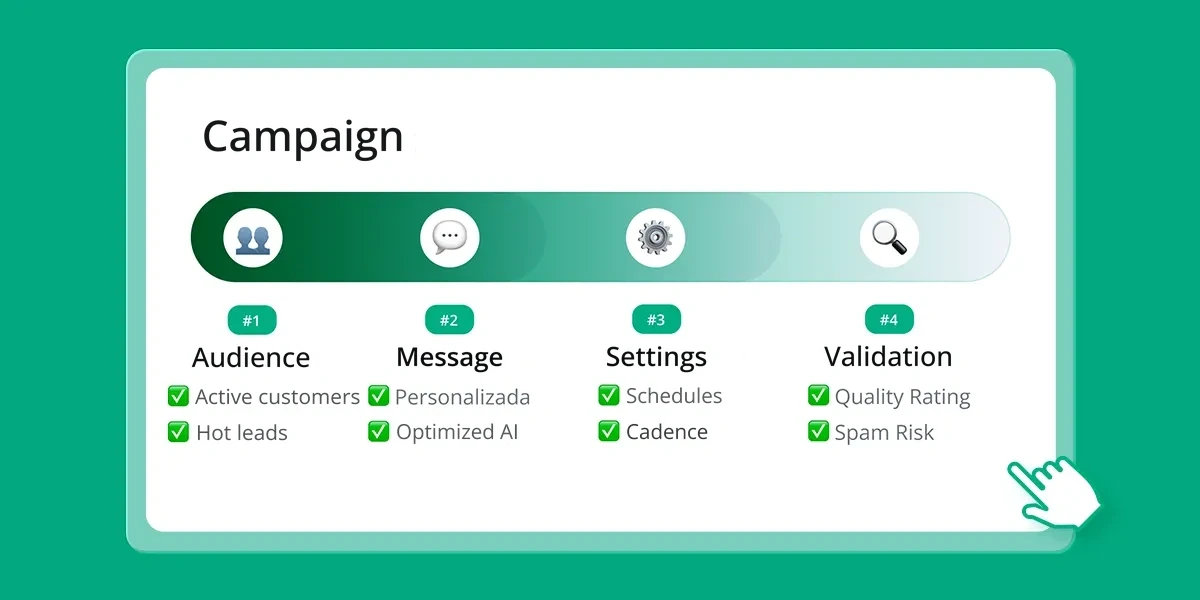
Well-structured campaigns on business WhatsApp follow a process that begins before the message is created.
1. Quality of the contact base
The send list is the most decisive factor in a campaign's success. Bases with contacts who don't remember opting in, outdated numbers or contacts with no real affinity for the topic produce high block rates from the start.
Best practices:
Check that numbers are valid before sending
Segment by engagement level and interaction history
Remove contacts inactive for more than 90 days
Never use purchased lists or lists collected without explicit consent
2. Creating the templates
Approved templates need to be clear, direct and relevant. Meta reviews the content before approving, and templates with ambiguous language or that mix categories are rejected or automatically reclassified.
Best practices:
Clearly separate transactional communications from promotional ones
Use personalization variables (name, product, date) to make the message individual
Always include an opt-out option (e.g.: "Reply STOP to stop receiving messages")
Keep the text objective, without exaggeration or unsupported promises
3. Cadence and volume
Send speed matters. Sending a very high volume of messages in a short interval is one of the patterns Meta identifies as risky behavior.
Best practices:
Spread sends across the day, not in bursts
Start with smaller volumes when using a new or recently reactivated number
Respect business hours so as not to cause annoyance and reports
4. Precise monitoring
Campaigns need active tracking. If the block rate rises during the campaign, it's important to have the visibility needed to pause and review the list and the content. That is smarter than continuing and compromising the number's reputation.
Mistakes companies make (and how to avoid them)
Most of the blocks and restrictions companies suffer on WhatsApp don't result from bad faith. They result from mistaken operational practices. The most frequent mistakes:
Using personal WhatsApp or the Business App for broadcasts at scale: the regular app wasn't designed for this and quickly detects atypical patterns. Numbers are banned without warning and without an easy way to appeal.
Buying contact lists: it's the fastest way to destroy a number's reputation. The recipients have no relationship with the company and tend to block or report the message immediately.
Not segmenting the base: sending the same message to the whole base, regardless of profile or history, produces low engagement rates and high block rates.
Ignoring the quality indicators: many teams launch campaigns without monitoring the Quality Rating. By the time they notice the number was restricted, part of the damage is already done.
Classifying templates incorrectly to pay less: since 2025, Meta detects and corrects classifications automatically. Templates reclassified from utility to marketing have a higher cost per message, and repeat offenders face additional penalties.
Not having a working opt-out: without a clear way for the contact to stop receiving messages, people block the number instead of unsubscribing. The effect on reputation is immediate.
Examples of use by sector
Different sectors use bulk sending on WhatsApp with different goals. What successful cases have in common is relevance, timing and consent.
Education
Educational institutions use WhatsApp to communicate re-enrollments, overdue tuition collections, exam notices and class cancellations. The channel's closeness to a young audience makes open rates significantly higher than email. Campaigns to attract new students also work well when the base was generated by ads or events where the lead opted in to be contacted.
Retail and e-commerce
Abandoned-cart recovery, order confirmations, delivery notices and reactivation campaigns for inactive customers. WhatsApp, being a channel with almost immediate reading, is especially effective for alerts with a short time window, such as flash sales or exclusive presales for the active base.
Healthcare
Clinics and health plan providers use the channel for appointment confirmations, reminders for periodic exams and post-procedure guidance. Opt-in in this sector is usually collected at the time of triage or scheduling, which ensures high relevance of the messages.
Collections and financial services
Due-date notifications, payment confirmations and debt renegotiation agreements. The one-to-one conversation on WhatsApp has historically outperformed SMS or email for credit recovery, especially on the first approach. Personalizing the message, with the name and exact amount, makes a relevant difference.
Logistics and transportation
Order tracking, delivery confirmation and incident communication. In these cases, the messages are almost always classified as utility, which simplifies the template approval process and reduces costs.
Customer service and support
Proactive maintenance notices, incident resolution and follow-up on open tickets. It reduces the volume of inbound contacts and improves the perception of service quality.
Send automation: what is possible today
Send automation on business WhatsApp goes beyond the simple "list blast". The most mature solutions today allow:
Sequential message flows: send an initial message and, depending on the reply or the lack of one, automatically trigger the following steps. This is the principle of conversational marketing applied at scale.
CRM integration: trigger messages from events recorded in the CRM, such as a change in a lead's status, the closing of a sale or the opening of a support ticket.
A/B testing: distribute two versions of a template to equivalent segments and identify which performs better before scaling to the whole base.
Personalization by variables: insert name, amount, date, product and other data specific to each contact directly into the template, making the message individual even when sent in bulk.
Smart sender selection: when a company has multiple active numbers, AI-powered systems can recommend which number should send to each contact based on interaction history, reducing the risk of blocking.
Configurable cadence: define intervals between sends to avoid patterns the platform identifies as spam.
Get to know our intelligence solution for your team: Zapper Intelligence — turn conversational data into decisions
The role of a specialized platform
Managing bulk sends on WhatsApp safely and efficiently is a task that requires infrastructure, intelligence and governance. Doing it manually or with generic tools becomes unfeasible as volume grows.
Specialized platforms deliver value at a few specific layers:
Reputation protection: monitoring of the Quality Rating and stopping campaigns when risk indicators rise.
Performance analysis: delivery, read, engagement and opt-out reports per campaign, with data for continuous optimization.
LGPD compliance: recording of opt-in and opt-out and secure storage of interactions, with traceability for audit cases.
At Zapper, there is a feature created specifically for managing bulk sends on business WhatsApp. Because it is a hybrid tool, it can blend sends via the API and regular WhatsApp (meeting the company's needs), and our tool has more freedom in creating messages (without the need for ready-made, pre-approved templates), allowing you to create send flows in three steps: campaign definition, AI optimization of the send parameters and tracking of results.
The built-in intelligence learns patterns that have historically caused blocks and avoids them, suggesting cadence adjustments, sender variation and content alternatives before each send. The manager sets the strategic parameters. The platform manages the execution.
Find out more about our solution: Zapper Flow — bulk sends with intelligence and reputation protection
Zapper also offers monitoring of corporate conversations, cloud storage and AI-powered conversation intelligence analysis, forming a complete suite for companies that take WhatsApp communication seriously.
FAQ
What is a bulk send on WhatsApp?
It is the automated, scheduled sending of messages to multiple contacts at the same time. In the corporate context, it uses the WhatsApp API or specialized platforms that integrate WhatsApp Business accounts with automated broadcast flows.
Is bulk broadcasting allowed on WhatsApp?
Yes, for the API, as long as it is done within Meta's rules. The fundamental requirements are: documented opt-in from recipients, use of approved templates for messages outside the 24-hour window and compliance with the platform's usage policy. For regular WhatsApp, a communication context is important to avoid being mistaken for spam.
What is the difference between WhatsApp Business and WhatsApp Business API?
The WhatsApp Business (app) is the simplest and most practical option for day-to-day operation (organizing conversations, catalog and basic automations), while the WhatsApp Business Platform (API) is Meta's infrastructure for larger operations, with approved templates, integrations (CRM/webhooks) and governance for scaling sends; even so, for many companies regular WhatsApp/Business remains the most efficient path — and that is exactly where the tool presented in this text operates, connecting real accounts and enabling campaigns and management with more flexibility, without the bureaucracy typical of the API.
How many messages can I send per day on WhatsApp?
It depends on the account's tier. Newly verified companies start with 1,000 unique conversations per day. The limit rises progressively to 10,000, 100,000 and no defined limit, depending on the quality of the sends and consistent volume of use. Unverified accounts have a limit of 250.
What happens if my number is blocked?
Depending on severity, the number may be temporarily restricted (prevented from starting new conversations for 24 hours) or have its tier reduced. In cases of serious and recurring violations, the ban can be permanent. Recovering a banned number is difficult and, in many cases, impossible.
How do I prevent my number from being banned on WhatsApp?
The essential points are: use only contacts with opt-in, keep the Quality Rating green, don't exceed tier limits, use approved templates and monitor quality indicators in real time. Tools with anti-block protection automate part of this control.
Do I need consent to send a message on WhatsApp?
For broadcasts via the API, yes. Meta requires explicit opt-in for proactive messages initiated by the company. The LGPD, in Brazil, reinforces this requirement at the level of law. Consent needs to be specific to the type of message that will be sent and must be documentable.
What is a message template and how does approval work?
A template is a message model pre-approved by Meta that can be used outside the 24-hour service window. Every company that uses the API must submit its templates for review. Approval takes up to 24 hours. Templates that contain promotional language are classified as marketing, with specific costs and rules.
Can I use artificial intelligence in bulk sends?
Yes. Specialized platforms already incorporate AI to recommend senders, identify risk patterns, suggest cadence adjustments and analyze sentiment in replies. This makes broadcasts more efficient and less likely to generate blocks.
What is the Quality Rating and how does it affect my sends?
It is the number's reputation indicator, calculated by Meta based on recipients' feedback signals. Numbers with a red Quality Rating face sending restrictions and can't advance in tier. Keeping the rating green is a condition for scaling campaign volume.
Conclusion
Sending bulk messages on business WhatsApp is a legitimate, efficient and strategic practice. What separates those who scale consistently from those who accumulate blocks comes down to three factors: quality of the base, respect for the platform's rules and use of adequate infrastructure.
WhatsApp is the preferred communication channel of 147 million Brazilians and is present in more than 80% of the country's business relationships. Ignoring it as a corporate channel isn't a realistic option. But using it carelessly is worse than not using it.
Companies that treat broadcasts seriously, building bases with real opt-in, creating relevant templates and monitoring quality indicators in real time, can scale communication without compromising the number's reputation or the customer experience.
For those looking for a platform that integrates broadcasting, monitoring and conversation intelligence in a single environment, Zapper offers this structure with the flexibility of operating with the API and with direct WhatsApp Business accounts, adapting to the size and maturity of each operation.
Schedule a Zapper demo and see how to structure campaigns at scale safely.

Sources:
Sending messages at scale through WhatsApp is a real need for most companies. But the line between efficient communication and spam is thinner than it seems, and the consequences of crossing it are serious: a blocked number, a damaged reputation and broken relationships with customers.
This guide covers the subject end to end, from the definition of bulk sending to Meta's updated rules, including the most common mistakes and the best practices for scaling campaigns without compromising the user experience.
What is a bulk send on WhatsApp?
A bulk send, or batch broadcast, is the automated sending of messages to multiple recipients simultaneously or on a schedule. In the corporate context, this includes marketing campaigns, transactional notifications, operational alerts and relationship communications.
What sets a professional bulk send apart from personal WhatsApp use isn't just volume. It's the infrastructure behind it, the segmentation of the base, the content of the messages and, above all, the recipients' consent.
Companies that do this correctly use the WhatsApp Business Platform (API), the official infrastructure Meta provides for communications at scale. Anyone who tries to replicate the same result with the regular app or unofficial tools is operating outside the terms of service, at risk of a permanent ban on the number.
Find out more in this article: Is your company taking full advantage of WhatsApp Business?
Spam versus business communication: what's the real difference?
The confusion between spam and legitimate business communication is responsible for a good share of the blocks companies suffer. But the distinction is objective.
Spam is any message sent without prior consent, with content irrelevant to the recipient, at excessive frequency or with the intent to deceive. On WhatsApp, spam is usually identified by the users themselves, who block the number or report it to the platform.
Legitimate business communication is one in which:
The recipient opted in to receive messages on that channel (documentable opt-in);
The content is relevant to that contact's moment and context;
The frequency is reasonable and not intrusive;
There is a clear way to unsubscribe (opt-out);
The sends respect the policies of the platform used.
Meta doesn't prohibit bulk sending. It regulates how that sending happens. Companies that follow the rules can scale communication safely. Those that ignore the rules are penalized progressively: first the number's reputation degrades, then it is restricted, and in serious cases, permanently banned.
How does the WhatsApp Business Platform (API) work?
The WhatsApp Business Platform (formerly called the WhatsApp Business API) is the infrastructure layer that lets companies send messages at scale, programmatically and integrated with other systems.
To access it, companies need a verified account in Meta Business Manager and the intermediation of an official partner (Business Solution Provider, or BSP). Direct access to the Cloud API is also possible for companies with a technical team.
What the API allows
Sending template messages to contacts who opted in
Integration with CRMs, customer service platforms and automation systems
Service by multiple agents on the same number
Webhooks to receive real-time notifications
Support for text, images, documents, videos and interactive buttons
What the API doesn't cover
Use of groups and communities
Free-form messages outside the 24-hour window without an approved template
Broadcasts to contacts with no recorded opt-in
Find out more in this article: Professional WhatsApp without the API's restrictions
It's worth clarifying: the API isn't the only solution for business communication on WhatsApp. Platforms like Zapper operate independently of the API, connecting directly to the company employees' WhatsApp Business accounts and offering broadcast, monitoring and intelligence capabilities without the restrictions and variable costs of Meta's infrastructure.
Find out more in this article: WhatsApp API: is it for my company or do I need another solution?
Meta's rules: what the official documentation says
Meta's policy for commercial use of WhatsApp is documented in the WhatsApp Business Messaging Policy and in the platform's developer guidelines. The central points:
Mandatory opt-in
Before starting any proactive conversation, the company needs the contact's documented consent. This opt-in can be collected through website forms, on WhatsApp itself, on landing pages or on other channels. What isn't accepted is presuming consent because the number appears on a purchased list or in old records.
Message templates and categories
Messages sent outside the active service window (the 24 hours after the customer's last message) must use a template approved by Meta.
Meta divides templates into three categories:
Marketing: promotional campaigns, launches, newsletters, re-engagement. These go through the most scrutiny in the approval process and have a higher cost per message.
Utility: transactional messages tied to a user action, such as order confirmations, appointment reminders, tracking updates and payment alerts.
Authentication: sending verification codes (OTPs). Fixed format, with no room for marketing content.
Since April 2025, Meta has tightened the automatic classification of templates. Templates submitted as "utility" that contain promotional language are automatically moved to the marketing category, with a direct impact on cost and sending conditions. Companies that abuse classification to pay less receive progressive restrictions.
Prohibited content
Meta's policy prohibits sends related to illegal products, unauthorized adult content, get-rich-quick schemes, among others. Regulated sectors (such as gambling and certain financial services) have additional restrictions and need prior authorization.
Tier system and sending limits
Meta controls companies' sending capacity through a system of progressive tiers. New verified numbers start with a limit of 250 unique conversations per day (outside the service window). As the company demonstrates quality in its sends, the limits rise automatically.
The available tiers are:
Tier | Daily limit of unique conversations started by the company |
|---|---|
Initial (unverified) | 250 |
Tier 1 (verified) | 1,000 |
Tier 2 | 10,000 |
Tier 3 | 100,000 |
Tier 4 | No defined limit |
To move from one tier to the next, the company must maintain a high quality rating (green) and demonstrate a consistent volume of sends. Meta automatically evaluates accounts in 6-hour cycles to decide on upgrades.
Since October 2025, limits are calculated at the portfolio level, not per individual number. This means all WhatsApp numbers linked to the same Business Portfolio share the same daily limit.
What counts toward the limit
Only messages initiated by the company outside the 24-hour window. Replies to customers who have already opened a conversation don't consume the quota.
Number reputation: how it works and why it matters
The number's reputation, which Meta calls the Quality Rating, is the main thermometer of the health of a WhatsApp Business account. It is calculated based on recipients' feedback signals over the last 24 to 48 hours, weighted by recency.
The three possible states are:
🟢Green (High Quality): well-received messages, with few blocks or reports. The number is eligible for tier upgrades.
🟡Yellow (Medium Quality): volume of reports above normal. The number can keep operating, but doesn't advance in tier and is under observation.
🔴Red (Low Quality): critical level of reports. The number faces sending restrictions.
When quality drops to red, the number may be temporarily flagged, which prevents the sending of new company-initiated messages. If quality doesn't recover, the tier limit is reduced to the level immediately below.
What destroys reputation
Sending messages without real opt-in
High frequency of sends with no perceived value
Generic content with no personalization
Contacts who block the number after receiving the message
Templates with aggressive or misleading language
What sustains reputation
Documented, recent opt-in
Personalized templates that are relevant to the recipient
Controlled frequency
A clear and working opt-out channel
Active monitoring of quality indicators
Learn how to use our solutions to optimize your results: Zapper Monitoring
How to structure campaigns without causing blocks
Well-structured campaigns on business WhatsApp follow a process that begins before the message is created.
1. Quality of the contact base
The send list is the most decisive factor in a campaign's success. Bases with contacts who don't remember opting in, outdated numbers or contacts with no real affinity for the topic produce high block rates from the start.
Best practices:
Check that numbers are valid before sending
Segment by engagement level and interaction history
Remove contacts inactive for more than 90 days
Never use purchased lists or lists collected without explicit consent
2. Creating the templates
Approved templates need to be clear, direct and relevant. Meta reviews the content before approving, and templates with ambiguous language or that mix categories are rejected or automatically reclassified.
Best practices:
Clearly separate transactional communications from promotional ones
Use personalization variables (name, product, date) to make the message individual
Always include an opt-out option (e.g.: "Reply STOP to stop receiving messages")
Keep the text objective, without exaggeration or unsupported promises
3. Cadence and volume
Send speed matters. Sending a very high volume of messages in a short interval is one of the patterns Meta identifies as risky behavior.
Best practices:
Spread sends across the day, not in bursts
Start with smaller volumes when using a new or recently reactivated number
Respect business hours so as not to cause annoyance and reports
4. Precise monitoring
Campaigns need active tracking. If the block rate rises during the campaign, it's important to have the visibility needed to pause and review the list and the content. That is smarter than continuing and compromising the number's reputation.
Mistakes companies make (and how to avoid them)
Most of the blocks and restrictions companies suffer on WhatsApp don't result from bad faith. They result from mistaken operational practices. The most frequent mistakes:
Using personal WhatsApp or the Business App for broadcasts at scale: the regular app wasn't designed for this and quickly detects atypical patterns. Numbers are banned without warning and without an easy way to appeal.
Buying contact lists: it's the fastest way to destroy a number's reputation. The recipients have no relationship with the company and tend to block or report the message immediately.
Not segmenting the base: sending the same message to the whole base, regardless of profile or history, produces low engagement rates and high block rates.
Ignoring the quality indicators: many teams launch campaigns without monitoring the Quality Rating. By the time they notice the number was restricted, part of the damage is already done.
Classifying templates incorrectly to pay less: since 2025, Meta detects and corrects classifications automatically. Templates reclassified from utility to marketing have a higher cost per message, and repeat offenders face additional penalties.
Not having a working opt-out: without a clear way for the contact to stop receiving messages, people block the number instead of unsubscribing. The effect on reputation is immediate.
Examples of use by sector
Different sectors use bulk sending on WhatsApp with different goals. What successful cases have in common is relevance, timing and consent.
Education
Educational institutions use WhatsApp to communicate re-enrollments, overdue tuition collections, exam notices and class cancellations. The channel's closeness to a young audience makes open rates significantly higher than email. Campaigns to attract new students also work well when the base was generated by ads or events where the lead opted in to be contacted.
Retail and e-commerce
Abandoned-cart recovery, order confirmations, delivery notices and reactivation campaigns for inactive customers. WhatsApp, being a channel with almost immediate reading, is especially effective for alerts with a short time window, such as flash sales or exclusive presales for the active base.
Healthcare
Clinics and health plan providers use the channel for appointment confirmations, reminders for periodic exams and post-procedure guidance. Opt-in in this sector is usually collected at the time of triage or scheduling, which ensures high relevance of the messages.
Collections and financial services
Due-date notifications, payment confirmations and debt renegotiation agreements. The one-to-one conversation on WhatsApp has historically outperformed SMS or email for credit recovery, especially on the first approach. Personalizing the message, with the name and exact amount, makes a relevant difference.
Logistics and transportation
Order tracking, delivery confirmation and incident communication. In these cases, the messages are almost always classified as utility, which simplifies the template approval process and reduces costs.
Customer service and support
Proactive maintenance notices, incident resolution and follow-up on open tickets. It reduces the volume of inbound contacts and improves the perception of service quality.
Send automation: what is possible today
Send automation on business WhatsApp goes beyond the simple "list blast". The most mature solutions today allow:
Sequential message flows: send an initial message and, depending on the reply or the lack of one, automatically trigger the following steps. This is the principle of conversational marketing applied at scale.
CRM integration: trigger messages from events recorded in the CRM, such as a change in a lead's status, the closing of a sale or the opening of a support ticket.
A/B testing: distribute two versions of a template to equivalent segments and identify which performs better before scaling to the whole base.
Personalization by variables: insert name, amount, date, product and other data specific to each contact directly into the template, making the message individual even when sent in bulk.
Smart sender selection: when a company has multiple active numbers, AI-powered systems can recommend which number should send to each contact based on interaction history, reducing the risk of blocking.
Configurable cadence: define intervals between sends to avoid patterns the platform identifies as spam.
Get to know our intelligence solution for your team: Zapper Intelligence — turn conversational data into decisions
The role of a specialized platform
Managing bulk sends on WhatsApp safely and efficiently is a task that requires infrastructure, intelligence and governance. Doing it manually or with generic tools becomes unfeasible as volume grows.
Specialized platforms deliver value at a few specific layers:
Reputation protection: monitoring of the Quality Rating and stopping campaigns when risk indicators rise.
Performance analysis: delivery, read, engagement and opt-out reports per campaign, with data for continuous optimization.
LGPD compliance: recording of opt-in and opt-out and secure storage of interactions, with traceability for audit cases.
At Zapper, there is a feature created specifically for managing bulk sends on business WhatsApp. Because it is a hybrid tool, it can blend sends via the API and regular WhatsApp (meeting the company's needs), and our tool has more freedom in creating messages (without the need for ready-made, pre-approved templates), allowing you to create send flows in three steps: campaign definition, AI optimization of the send parameters and tracking of results.
The built-in intelligence learns patterns that have historically caused blocks and avoids them, suggesting cadence adjustments, sender variation and content alternatives before each send. The manager sets the strategic parameters. The platform manages the execution.
Find out more about our solution: Zapper Flow — bulk sends with intelligence and reputation protection
Zapper also offers monitoring of corporate conversations, cloud storage and AI-powered conversation intelligence analysis, forming a complete suite for companies that take WhatsApp communication seriously.
FAQ
What is a bulk send on WhatsApp?
It is the automated, scheduled sending of messages to multiple contacts at the same time. In the corporate context, it uses the WhatsApp API or specialized platforms that integrate WhatsApp Business accounts with automated broadcast flows.
Is bulk broadcasting allowed on WhatsApp?
Yes, for the API, as long as it is done within Meta's rules. The fundamental requirements are: documented opt-in from recipients, use of approved templates for messages outside the 24-hour window and compliance with the platform's usage policy. For regular WhatsApp, a communication context is important to avoid being mistaken for spam.
What is the difference between WhatsApp Business and WhatsApp Business API?
The WhatsApp Business (app) is the simplest and most practical option for day-to-day operation (organizing conversations, catalog and basic automations), while the WhatsApp Business Platform (API) is Meta's infrastructure for larger operations, with approved templates, integrations (CRM/webhooks) and governance for scaling sends; even so, for many companies regular WhatsApp/Business remains the most efficient path — and that is exactly where the tool presented in this text operates, connecting real accounts and enabling campaigns and management with more flexibility, without the bureaucracy typical of the API.
How many messages can I send per day on WhatsApp?
It depends on the account's tier. Newly verified companies start with 1,000 unique conversations per day. The limit rises progressively to 10,000, 100,000 and no defined limit, depending on the quality of the sends and consistent volume of use. Unverified accounts have a limit of 250.
What happens if my number is blocked?
Depending on severity, the number may be temporarily restricted (prevented from starting new conversations for 24 hours) or have its tier reduced. In cases of serious and recurring violations, the ban can be permanent. Recovering a banned number is difficult and, in many cases, impossible.
How do I prevent my number from being banned on WhatsApp?
The essential points are: use only contacts with opt-in, keep the Quality Rating green, don't exceed tier limits, use approved templates and monitor quality indicators in real time. Tools with anti-block protection automate part of this control.
Do I need consent to send a message on WhatsApp?
For broadcasts via the API, yes. Meta requires explicit opt-in for proactive messages initiated by the company. The LGPD, in Brazil, reinforces this requirement at the level of law. Consent needs to be specific to the type of message that will be sent and must be documentable.
What is a message template and how does approval work?
A template is a message model pre-approved by Meta that can be used outside the 24-hour service window. Every company that uses the API must submit its templates for review. Approval takes up to 24 hours. Templates that contain promotional language are classified as marketing, with specific costs and rules.
Can I use artificial intelligence in bulk sends?
Yes. Specialized platforms already incorporate AI to recommend senders, identify risk patterns, suggest cadence adjustments and analyze sentiment in replies. This makes broadcasts more efficient and less likely to generate blocks.
What is the Quality Rating and how does it affect my sends?
It is the number's reputation indicator, calculated by Meta based on recipients' feedback signals. Numbers with a red Quality Rating face sending restrictions and can't advance in tier. Keeping the rating green is a condition for scaling campaign volume.
Conclusion
Sending bulk messages on business WhatsApp is a legitimate, efficient and strategic practice. What separates those who scale consistently from those who accumulate blocks comes down to three factors: quality of the base, respect for the platform's rules and use of adequate infrastructure.
WhatsApp is the preferred communication channel of 147 million Brazilians and is present in more than 80% of the country's business relationships. Ignoring it as a corporate channel isn't a realistic option. But using it carelessly is worse than not using it.
Companies that treat broadcasts seriously, building bases with real opt-in, creating relevant templates and monitoring quality indicators in real time, can scale communication without compromising the number's reputation or the customer experience.
For those looking for a platform that integrates broadcasting, monitoring and conversation intelligence in a single environment, Zapper offers this structure with the flexibility of operating with the API and with direct WhatsApp Business accounts, adapting to the size and maturity of each operation.
Schedule a Zapper demo and see how to structure campaigns at scale safely.